How to Write YouTube Titles That Get Clicks
Quick answer: a clickable title front-loads the hook (first 3-4 words do the work), stays around 60 characters, makes one specific promise the video keeps, and doesn't repeat the thumbnail — the two are a team. Numbers, stakes and curiosity beat vague summaries.
Your thumbnail stops the scroll; your title closes the click — and in search, the title is the hook. Most videos lose viewers not because the content is bad, but because the title describes the video instead of selling it. Here's how to fix that, with rules, formulas and examples you can copy.
Weak titles describe. Strong titles sell.
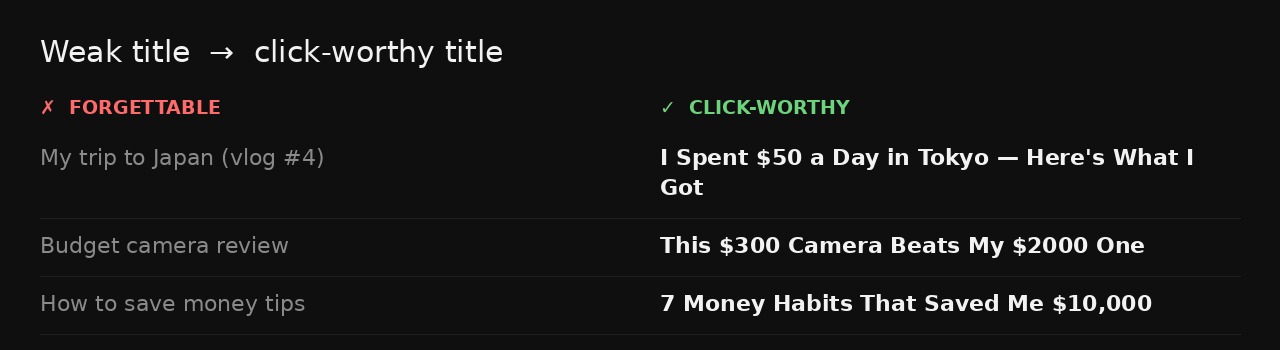
The single biggest upgrade is shifting from "here's what this video is" to "here's why you can't skip it." Same video, different framing:
7 rules for titles that get clicked
- Front-load the hook. The first 3-4 words decide whether anyone reads the rest. Put the most surprising or valuable part first, not the setup.
- Be specific, not vague. "$50 a day in Tokyo" beats "my Japan trip." "$10,000" beats "a lot of money." Concrete numbers and details feel true and clickable.
- Make one clear promise. One idea per title. If a viewer can't tell what they'll get, they scroll on.
- Create a curiosity gap — then deliver. Hint at the answer without giving it away ("This $300 camera beats my $2000 one"). The video must pay it off.
- Use numbers and power words. Lists ("7 habits"), outcomes ("saved", "beats"), and stakes ("I quit", "before it's too late") raise click-through.
- Include the search phrase, naturally. For searchable topics, work in the term people type — near the front, without stuffing keywords.
- Don't repeat the thumbnail. The image and a few words live on the thumbnail; the title adds the missing context. Two channels, two jobs.
Keep it short — the cut-off is brutal
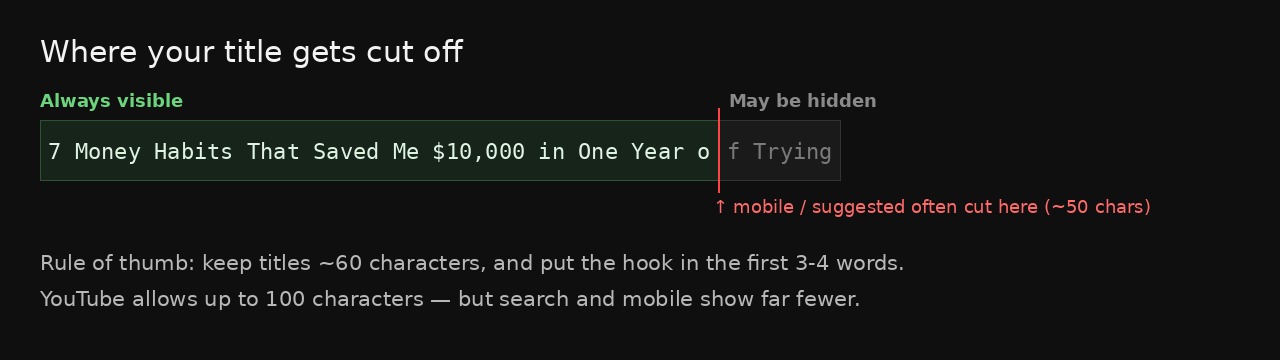
YouTube allows up to 100 characters, but almost nobody sees all of them. In search results and mobile feeds, titles get truncated well before that — often around 50-60 characters. If your hook lives at the end, it disappears.
| Where | Roughly visible |
|---|---|
| Desktop search / watch page | ~60-70 characters |
| Mobile feed & suggested | often ~50 characters or two lines |
| Notifications | even less |
Title formulas you can steal
When you're stuck, start from a proven structure and fill in your topic:
Don't want to brainstorm titles from scratch? BYSO reads your video and suggests optimized titles — plus description, tags and thumbnails — in about a minute.
Get title ideas free →Title + thumbnail = one message
The most common mistake even experienced creators make is treating the title and thumbnail as separate. They're a single unit. The thumbnail shows the emotion or the object; the title supplies the words the image can't. If both say the same thing, you've wasted half your pitch. Learn the visual half in our guide on how to make a clickable thumbnail.
Common mistakes that kill clicks
- Burying the hook behind setup words ("In this video I'm going to…").
- Overpromising. Clickbait the content doesn't deliver tanks watch time and the algorithm notices fast.
- ALL CAPS everything. One or two emphasized words pop; a full-caps title reads as shouting.
- Vague summaries ("My thoughts on the new update") with no reason to click.
- Keyword stuffing that reads like a robot wrote it.
FAQ
How long should a YouTube title be?
Around 60 characters. YouTube allows 100, but search and mobile cut titles off sooner — put the hook in the first 3-4 words.
Should the title repeat the thumbnail text?
No. The thumbnail hooks with image + a few words; the title adds the missing context. Repeating wastes one of your two channels.
Do keywords in titles matter?
Yes, naturally. Include the phrase people search, near the front, without stuffing. The title is read by humans and the algorithm.
Is clickbait bad?
Curiosity is good; lying isn't. Overpromising spikes clicks then craters watch time, and the algorithm demotes abandoned videos.